Welcome to OGC Open, The Online Golf Challenge!
First steps!
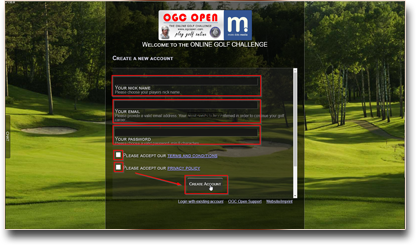
In order for your advancement as a golfer to be saved on the server, you must first register.
Besides an email address and a freely chosen player name, no further data is required.
Only A-Z a-z 0-9 as well as underscore, space, plus, hash mark, dot and minus are permitted for the player name. In addition, a maximum of three separators, four capital letters or five digits may be in a row.
Besides an email address and a freely chosen player name, no further data is required.
Only A-Z a-z 0-9 as well as underscore, space, plus, hash mark, dot and minus are permitted for the player name. In addition, a maximum of three separators, four capital letters or five digits may be in a row.
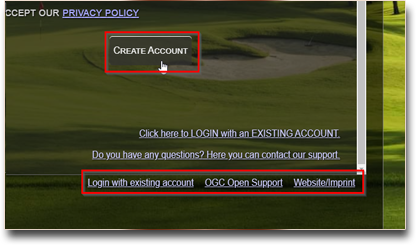
Then click on ‘Create account’ to finalise the process.
At the bottom of the screen are links to support and the website, and the option to switch between the registration and login pages.
If you want to delete your account again, simply send a short email or message to our support team.
At the bottom of the screen are links to support and the website, and the option to switch between the registration and login pages.
If you want to delete your account again, simply send a short email or message to our support team.
Golf course selection!
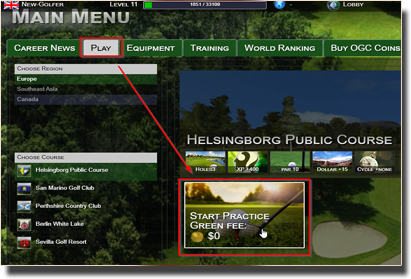
You start your golf career in Europe on the beautiful golf course in Helsingborg.
To do this, you can immediately click on the menu item ‘Start Practice’ to start the first practice game.
You can now decide whether you would prefer to play alone or with a partner.
This practice course has 3 holes and no tournament mode yet. It costs no green fee and has a reward of $50 if you finish with par.
To do this, you can immediately click on the menu item ‘Start Practice’ to start the first practice game.
You can now decide whether you would prefer to play alone or with a partner.
This practice course has 3 holes and no tournament mode yet. It costs no green fee and has a reward of $50 if you finish with par.
The first tee shot!
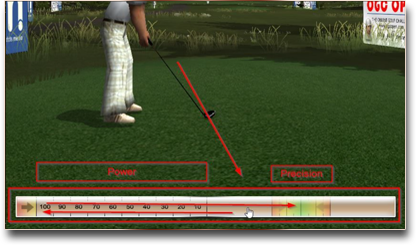
Three clicks on the so-called power bar are always required to tee off. The bar is located below the player.
- First click starts the tee (bar runs to the left)
- The second click determines the strength of the shot 0-100% (then the bar runs back)
- The third click determines the accuracy (it should hit the green area)
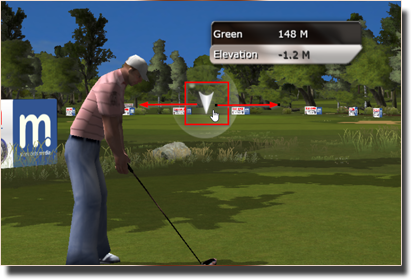
Tee shot direction.
Initially, the tee-off direction is always pre-selected exactly to the flag.
Depending on the wind and site conditions, this selection can of course also be adjusted.
To do this, simply drag the target triangle with the mouse to the left or right as required.
To do this, simply drag the target triangle with the mouse to the left or right as required.
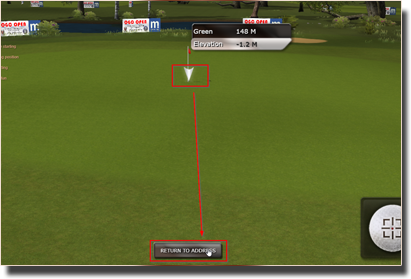
Tee shot direction: Detailed view.
However, you can also zoom in on the target by clicking on the target triangle.
You can then click again to set a new destination point.
Please note: the distance is always determined by the selected club and the power bar.
Click on “Return to Address” at the bottom of the screen, you can switch back to the normal view.
Please note: the distance is always determined by the selected club and the power bar.
Click on “Return to Address” at the bottom of the screen, you can switch back to the normal view.
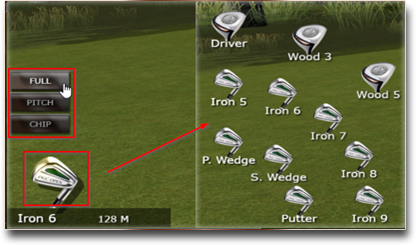
Selecting the club and the type of stroke!
The club selection is located on the left-hand side.
There you can also choose between full stroke, pitch and chip.
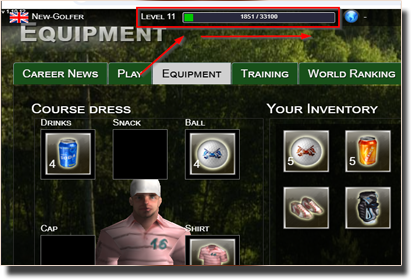
Character level system!
As you may have experienced it yourself, your character rises gradually to its level. You will become a level up,
if you have accumulated enough experience points. Good moves gives you more experience than
something worse. You can monitor the number of experience points at every stroke. If your character has
reached a new level, you receive training points which you can use to improve your golf skills.
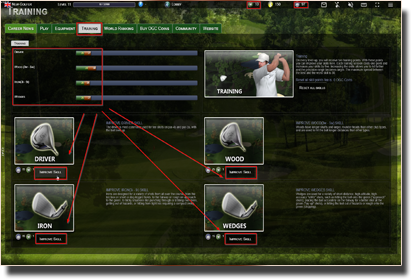
How to improve your skills and what are Training Points?
If your golfer has reached a new level, you automatically receive two training points. With that points you can go for a
special training in the training section. There you can improve your skills e.g. your driver abilities.
Every training session costs one point and increases your skills by five.
Upgrading your skills is also charged with OGC Coins. You can receive OGC Coins by playing tournaments
or you can purchase them at the online store. You also get OGC Coins on Level Ups.
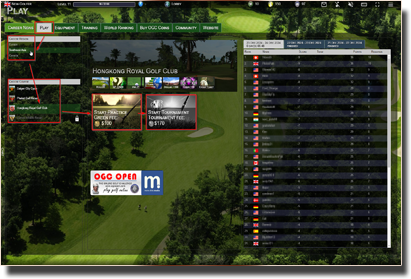
New golf courses?
On a level up, new fields of golf courses will be unlocked to your character. For a new course available,
you will get a notification in-game and via the in-game journal. Except the very first course all courses are tournament courses.
You will need to finish up with a certain score to unlock the tournament mode for each course.
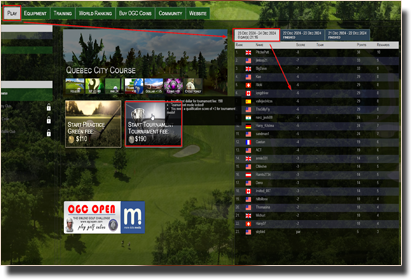
What are golf tournaments?
On all regular courses golf tournaments are conducted. Tournaments run daily, weekly or at a certain interval,
e.g. every 3 days. Within this period, a player can complete as many games as he wants. Only the best score counts
for the final result. At the end of the tournament the player will receive world ranking points and OGC Coins
according to its tourney placement. The amount of world ranking points and OGC Coins depends on the
particular golf course and the tournament interval.
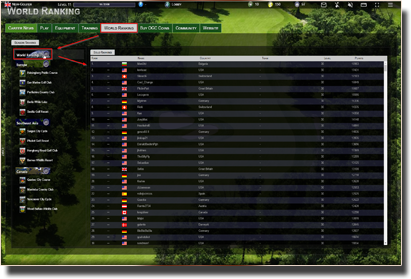
OGC Open world ranking list!
The world ranking list includes golfers who have ever played a tournament and have gained world ranking points.
You will receive ranking points also to a single region and even for a single course. So it is possible for
instance to be the best golfer in the region of Canada. You can watch the world rankings and other rankings at
the website. The world ranking is for one season. The best players in one season can be admired in our archives.
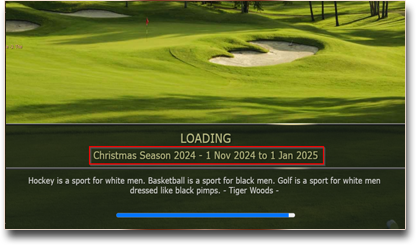
What is a season?
The golf year is divided into several seasons. Currently, a season runs 2 months. At the end of a
season the best player in the world rankings and the individual regional lists will be chosen.
The winners will be stored in our archive season and thus get an eternal place in the Hall of Fame.
With the start of a season, all the rankings resets and it starts all over again.
Thus, new players have the chance right from the outset to be there.
Please note, you will not lose any equipment or regions on season change.
Please note, you will not lose any equipment or regions on season change.
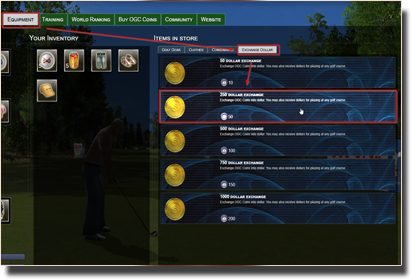
What are dollar?
For each game and each completed course you will get dollars. Dollars are needed to pay the green fee and the tournament entry fee.
You can also convert OGC Coins into dollars in our shop.

What are OGC Coins?
For participation in tournaments OGC Coins are credited. The better they play and the more
tournaments you participate the more you can get OGC Coins. Tournaments will be conducted
at any place and in every region. If you prefer, you can purchase OGC Coins at our shop.
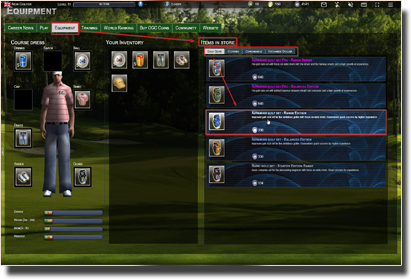
Golf equipment!
You can equip your golfers with a variety of equipment in our golf shop. We have a wide
selection of clubs sets, clothing, drinks and golf balls available. When using additional equipment you will improve
your playing skills dramatically. The improvement works naturally in
addition to your skills acquired through training.
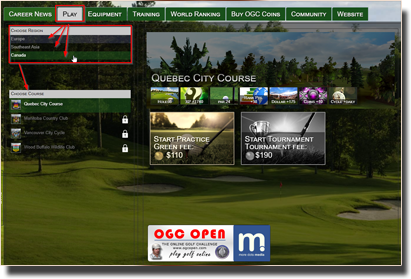
New exciting golf regions!
If you are on the course selection tab, the OGC Open regions will be displayed at the top left.
Simply click on the relevant region and the corresponding courses will be displayed below.

What are teams?
In OGC Open you can join forces with other players and compete together in the world rankings.
Every team has a name, its own icon and appears alongside individual golfers in the world ranking. Teams can be browsed in the Community section of the website and in-game under the "Teams" tab.
Every team has a name, its own icon and appears alongside individual golfers in the world ranking. Teams can be browsed in the Community section of the website and in-game under the "Teams" tab.

How do I create a team?
You can create a new team in-game under My Golfer → Team.
Enter a team name and click "Create team". You will automatically become the team leader.
Your team can then be filled with up to 14 additional members via the "Invite player" option (maximum team size: 15 players — currently in test phase, subject to change).
Invited players receive an invitation in their in-game journal where they can accept or decline it.
Your team can then be filled with up to 14 additional members via the "Invite player" option (maximum team size: 15 players — currently in test phase, subject to change).
Invited players receive an invitation in their in-game journal where they can accept or decline it.

Team roles: Leader and Member
Every team member has one of two roles:
Team Leader — can invite players, promote members and remove them, and change the team name and icon. A team can have multiple leaders at the same time.
Member — a regular member without management rights.
A leader can promote a member to leader. However, another leader account cannot be removed — only members can be excluded from the team.
If a leader wants to hand over leadership without leaving the team, they can use "Resign as leader" to become a regular member. The system will then automatically appoint the next active player as the new leader.
Team Leader — can invite players, promote members and remove them, and change the team name and icon. A team can have multiple leaders at the same time.
Member — a regular member without management rights.
A leader can promote a member to leader. However, another leader account cannot be removed — only members can be excluded from the team.
If a leader wants to hand over leadership without leaving the team, they can use "Resign as leader" to become a regular member. The system will then automatically appoint the next active player as the new leader.

Leaving a team or dissolution
Any player can leave the team at any time via My Golfer → Team → Leave team.
If the last leader leaves the team, the most active member is automatically appointed as the new leader. If the last remaining player leaves the team, the team is dissolved.
Team leaders who have been inactive for more than 3 months are automatically demoted to member by the system and an active member takes over leadership.
If the last leader leaves the team, the most active member is automatically appointed as the new leader. If the last remaining player leaves the team, the team is dissolved.
Team leaders who have been inactive for more than 3 months are automatically demoted to member by the system and an active member takes over leadership.

Team world ranking
Teams compete together in the world rankings. A team's ranking points come from its members' tournament results —
but not all members count equally: in each tournament, only the top 5 members by score contribute
points to the team.
This means: no matter how large a team is, only the 5 players with the best results in a given tournament determine how many points the team earns in that cycle. The remaining members do not contribute in that tournament, but may count in others.
Note: these numbers (team size and per-tournament contributors) are currently in the test phase and may be adjusted as balancing continues.
The team world ranking can be viewed in-game under Ranking → Teams and on this website.
This means: no matter how large a team is, only the 5 players with the best results in a given tournament determine how many points the team earns in that cycle. The remaining members do not contribute in that tournament, but may count in others.
Note: these numbers (team size and per-tournament contributors) are currently in the test phase and may be adjusted as balancing continues.
The team world ranking can be viewed in-game under Ranking → Teams and on this website.
Why is my player name rejected?
A player name can be rejected for several reasons:
Length: The name must be between 3 and 30 characters long.
Allowed characters: Only letters (A–Z, a–z), digits (0–9), underscore, space, plus, hash mark (#), dot and minus are allowed. Other special characters such as @, !, € etc. are not permitted.
First and last character: The name must begin with a letter. A trailing space is not allowed.
Similarity check: If a player or team with a very similar name already exists, the name will also be rejected. Special characters are ignored during the comparison — for example, "Jo-hn" and "John" are considered identical.
Prohibited words: Names containing a prohibited word are automatically rejected. Please choose a different name or contact our support team in this case.
Length: The name must be between 3 and 30 characters long.
Allowed characters: Only letters (A–Z, a–z), digits (0–9), underscore, space, plus, hash mark (#), dot and minus are allowed. Other special characters such as @, !, € etc. are not permitted.
First and last character: The name must begin with a letter. A trailing space is not allowed.
Similarity check: If a player or team with a very similar name already exists, the name will also be rejected. Special characters are ignored during the comparison — for example, "Jo-hn" and "John" are considered identical.
Prohibited words: Names containing a prohibited word are automatically rejected. Please choose a different name or contact our support team in this case.
I can't log in
If you are unable to log in, there are several possible causes:
E-mail address not confirmed: After registration, your account must be activated via the link in the confirmation e-mail. Login is not possible without this confirmation.
Wrong password: Check that uppercase and lowercase letters are correct. If you have forgotten your password, please contact our support team.
Account locked: In rare cases, an account may have been suspended by our support team. Please get in touch with us in this case.
E-mail address not confirmed: After registration, your account must be activated via the link in the confirmation e-mail. Login is not possible without this confirmation.
Wrong password: Check that uppercase and lowercase letters are correct. If you have forgotten your password, please contact our support team.
Account locked: In rare cases, an account may have been suspended by our support team. Please get in touch with us in this case.
Do you have any further questions?